
Low Latency Session
Use Low Latency Sessions when you want low-latency execution from a specific wallet on supported SpeedyTurtle trading screens.
Low Latency is tied to your wallet, not to a single screen.
When you start a low-latency session for a wallet on one supported screen, that same wallet becomes low-latency-active everywhere else that supports Low Latency for that wallet.
Low Latency Sessions are available on every subscription tier, including the free Minimum plan.
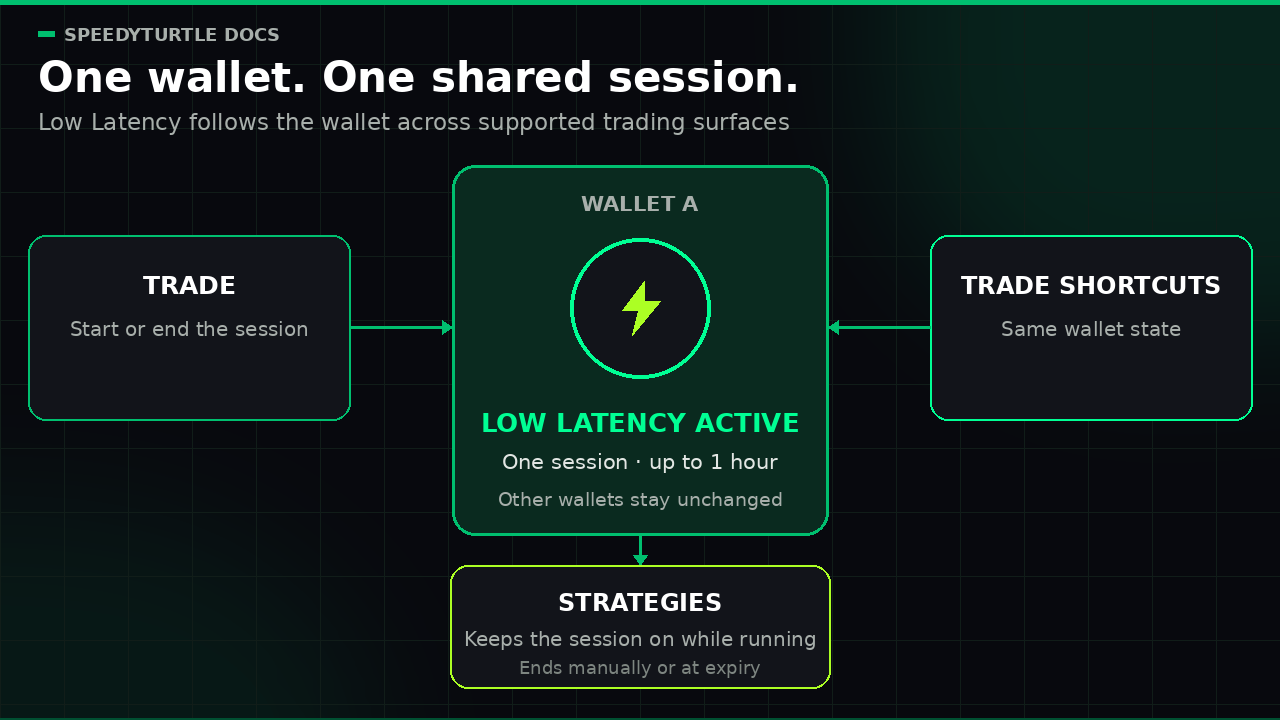
Where you can manage Low Latency
Manage Low Latency from the Telegram screens that show wallet status and the Low Latency row:
Low Latency is shared across these screens. You do not need to start it separately on each one.
If one screen does not show the Low Latency row for a wallet, open the other one.
Your automated strategies also use Low Latency automatically — see Low Latency and your strategies below.
How the session works
- each activation starts a low-latency session for one specific wallet
- the session can stay active for up to 1 hour
- SpeedyTurtle ends the session automatically when it expires
- you can end the session earlier from any supported screen that shows Low Latency controls for that wallet
- activating Low Latency for one wallet does not activate it for your other wallets
- one wallet can have only one active low-latency session at a time
If Low Latency is already active for a wallet, keep using the current session or end it first.
Starting it again does not create a second session for that same wallet.
This means the session is global for the wallet, but not global for your whole account.
What global wallet-level activation means
If you start Low Latency for a wallet from Trade:
- that wallet also shows as low-latency-active in Trade Shortcuts
- supported trading actions that use that wallet continue to use the same active low-latency session until it expires or you end it
- ending the session from another supported screen ends it for that wallet everywhere else too
Think of Low Latency as a shared wallet state.
Once it is on for that wallet, every screen and strategy that uses the wallet reflects the same session.
Low Latency and your strategies
Your automated strategies in the Strategy Hub rely on Low Latency for their fastest execution, and they manage it for you:
- while a strategy is actively running on a wallet, Low Latency is kept on for that wallet automatically
- if you turn Low Latency off on a wallet that has a running strategy, it can switch back on automatically, because the strategy needs it
- when no strategy needs the wallet and it goes idle, the session expires on its own
Info
To fully release a wallet — for example, before withdrawing from it — pause the strategies on that wallet first, then turn Low Latency off. Otherwise the wallet may stay busy and Low Latency may re-activate.
Start or end a session
If the Low Latency row is shown:
- Open any supported screen that displays the Low Latency controls.
- Find the wallet you want to use.
- Tap that wallet in the Low Latency row.
- Wait for the screen to refresh and show the updated wallet state.
In the current UI:
- a wallet with a cold indicator can start Low Latency
- a wallet with an active indicator can end the current low-latency session
Wallet eligibility
Not every wallet can start Low Latency immediately.
To start Low Latency, the wallet must already be funded or otherwise used on-chain.
If the wallet is not yet eligible:
- the engine does not start the session
- you may see a short error message instead
A brand-new wallet usually needs its first on-chain activity before it can qualify.
A wallet with prior on-chain activity may still qualify even if its current SOL balance is zero.
What Low Latency is not
To avoid confusion:
- Low Latency is not a separate strategy
- Low Latency is not a screen-level toggle
- Low Latency is not activated for all of your wallets at once
- Low Latency is not a permanent wallet setting
- Low Latency does not stay on after the session expires or after you end it
Documentation maintained by SpeedyTurtle Labs.