
Strategy Builder
The Strategy Builder is where you compose a strategy. You build it as a sequence of stages, and the builder shows you a plain-English summary, categorical Strategy Readiness, and factual Capital allocation limits as you go.
You reach the builder by opening a template, tapping Start from scratch (the Advanced Custom fixed-Buy skeleton), or tapping Edit in Builder on a never-activated Draft. After a strategy has been activated once, change its rules by duplicating it into a new Draft instead.
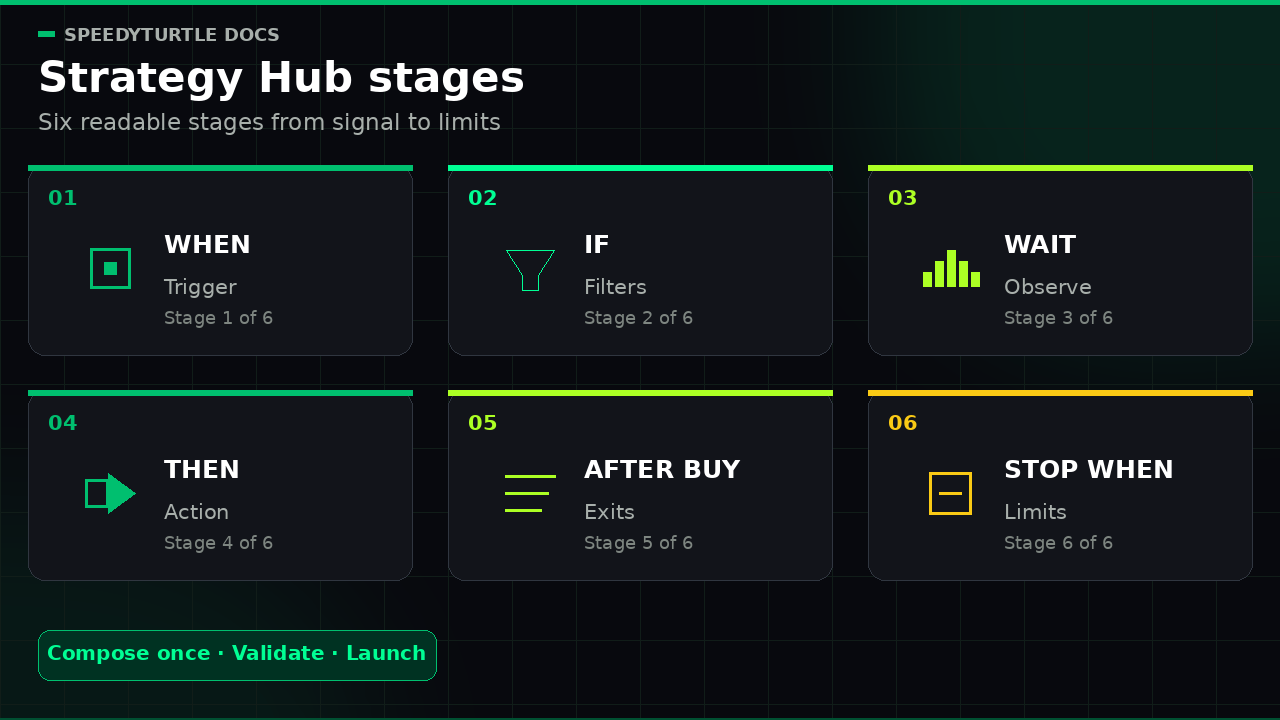
The six stages
A strategy reads like a sentence, made of up to six stages:
| Stage | Question it answers |
|---|---|
| WHEN | What event should start this strategy? |
| IF | What must be true before it acts? |
| WAIT | Should it pause and re-check before buying? |
| THEN | How should it buy? |
| AFTER BUY | How should it manage and exit the position? |
| STOP WHEN | What limits should cap the whole strategy? |
You move down the stages, filling in each one. The builder keeps a running, colour-coded summary so you can always read your strategy back in plain language.
WHEN — the trigger
The trigger is the event that wakes your strategy up. Choose one:
| Trigger | Availability | Fires when |
|---|---|---|
| New token launch | Available at go-live | A brand-new token launches on Pump.fun |
| Migration detected | Available at go-live | A token migrates from the Pump.fun curve to a PumpSwap pool |
| Tracked wallet buys | Available at go-live | A wallet you follow opens a position |
| Tracked wallet sells | Available at go-live on Monitor & Alert (notify) and Start from scratch / Advanced Custom (contrarian fixed Buy); not available on Wallet Copy Trade or other Copy Buy templates | A wallet you follow exits a position |
| Dev launches a token | Available at go-live (Pro) | A developer wallet you watch creates a new token |
| Liquidity added | Coming Soon | A token's pool liquidity reaches a USD threshold you set |
| Market cap target | Coming Soon | A token's market cap crosses a threshold you set |
| Time since launch | Coming Soon | A token from your allow list reaches an age measured from launch |
| Time since migration | Coming Soon | A token from your allow list reaches an age measured from migration |
Info
Coming Soon triggers are shown in the Builder so you can see what is planned, but they are disabled and cannot be used to launch or resume a strategy. The reserved price-target trigger is hidden entirely. Each template only offers the triggers that fit its shape — for example, Wallet Copy Trade exposes tracked-wallet buys, not sells.
For wallet- and dev-based triggers, you provide the list of wallets to follow. Each strategy can follow up to your plan's wallets-per-strategy limit (3 on Minimum and 10 on Pro).
When the timer triggers are released, they will work over an explicit list of tokens paired with a Token allow list filter. The engine will not scan every token's age.
Venue (WHEN-stage control)
Venue is a dedicated WHEN-stage control, not an IF library filter. Some available triggers are tied to a venue by nature — new launches and dev launches happen on Pump.fun, migrations land on PumpSwap, and the builder shows this as a locked badge. Tracked-wallet triggers can fire on either venue, so you pick Pump.fun, PumpSwap, or All. All means every currently supported venue (Pump.fun and PumpSwap); it does not include disabled roadmap venues.
The same venue picker previews BONK.fun (LetsBONK), Raydium, Meteora, Orca, Moonshot, Boop.fun, and Moonit as Coming Soon. Those entries are disabled and cannot be written into a strategy. Liquidity and market-cap venue controls will become usable when those Coming Soon triggers are released.
IF — the filters
Filters decide whether the strategy actually acts when its trigger fires. Every filter you add must pass — they combine with AND. At go-live, each condition type can be added once; support for multiple instances of the same condition is planned.
Available at go-live
The Builder exposes these conditions when they are compatible with the selected trigger and venue:
- Token — Market cap, Token age, and Social presence
- Safety — Has image
- Market — Migration status, Price change, Volume, Unique buyers (Pro), Trade counts (Pro), and Pre-migration activity
- Lists — Trade origin, Token allow/block list, and Wallet allow/block list
Some conditions appear only for relevant triggers or venues. For example, a wallet list and Trade origin need a tracked-wallet signal, while Pre-migration activity belongs to PumpSwap migration context. Paid conditions show a plan lock in the app. A condition that lacks fresh or complete input defers with a reason instead of guessing or fetching during evaluation.
Coming Soon and hidden conditions
The following conditions remain visible with Coming Soon and cannot be added to a runnable V1 strategy: Mint authority revoked, Freeze authority revoked, Mutable metadata, Liquidity, Dev holding, Dev allow/block list, Tracked trade size, No early dev sell, Trade origin share, and Wallet Intelligence.
LP burned or locked is hidden rather than advertised because V1 has no authoritative source for it. An unexpected saved definition containing a Coming Soon or hidden condition cannot launch or resume; the Builder keeps the draft fail-closed instead of silently deleting the user's condition.
Wallet Intelligence itself is a data-free Coming Soon surface in V1. See Wallet Intelligence.
WAIT — the observation window
The wait stage is optional. It delays the next evaluation for 1 to 3,600 seconds. With Re-check filters enabled, the strategy evaluates the conditions again from current resident data before it can request a buy. A condition whose input was still warming must become measurable after the wait even when ordinary re-checking is disabled.
This is useful for new launches: waiting a short window and re-confirming that the token still passes your checks helps you avoid tokens that look fine for one block and rug the next. If the required evaluation does not pass after the wait, no buy request is dispatched.
THEN — the action
The action is what the strategy does once the trigger fires and the filters pass. In V1 the template pins the action — you configure its settings, but you do not freely switch among Buy, Copy buy, and Notify on the same template:
| Action | Templates that use it | What it does |
|---|---|---|
| Buy | Launch Sniper, Migration Sniper, Dev Wallet Strategy, Campaign Sniper, Start from scratch / Advanced Custom | Dispatches a buy request with a fixed SOL principal |
| Copy buy | Wallet Copy Trade (and the Coming Soon Wallet Intelligence copy templates) | Dispatches a buy request sized from the followed wallet — either a fixed SOL amount or a percentage of the wallet's observed buy — subject to a per-signal cap |
| Notify only | Monitor & Alert | Records an alert request and opens no position; this is not a delivery receipt |
Cancel-pending is an internal engine contract in V1. It is not offered as a public Builder action and cannot be launched from Strategy Hub.
Copy-buy settings
The Copy buy action has these V1 controls:
- Fixed SOL / Match wallet % — copy every eligible signal with a fixed amount, or size it as a percentage of the authoritative observed buy. USDC observations require a fresh resident SOL/USD rate; an unavailable or stale amount/rate skips with a reason instead of fetching or guessing.
- Max copy amount (hard cap / signal) — the most the strategy may spend on any one copied signal, even when percentage sizing calculates a larger amount.
- Ignore follow-up buys — the first observed trigger-matching buy claims the token even if it is later filtered or skipped. Fixed SOL uses the latency-first observation; Match wallet % waits for the first authoritative processed observation because an instruction hint cannot be sized. Later buys for that token are ignored.
Follow-up accumulation and its total per-token cap are not available at V1 launch. A draft containing that roadmap mode cannot launch or resume; use Ignore follow-up buys.
Execution settings
For any buy, you also set:
- the wallet that places the trade
- maximum slippage
Priority fees, tips, execution routing, and protection are platform-managed in V1. The Builder does not expose separate fee, tip, or MEV-protection toggles.
AFTER BUY — managing the position
These rules manage a position once it is open. You can combine several. Each type can be used once.
| Exit rule | What it does |
|---|---|
| Take-profit ladder | Requests portions at rising profit targets — up to five rungs (for example, request 50% at +100%, then 30% at +250%) |
| Stop loss | Requests all — or a percentage you choose — when the position falls past a loss threshold |
| Time exit | Requests all or a percentage after a set time |
| Moonbag | Keeps a percentage of the position when other rules sell out |
| Copied wallet sells | Reacts when the wallet you copied sells: request a sell or partial sell, or record an alert request |
| Dev sells | Reacts when the token's developer sells: request a sell or partial sell, or record an alert request (Pro) |
Trailing stop is hidden and unavailable in V1. The profit-conditional variant of Time exit is Coming Soon; go-live Time Exit is unconditional. Existing drafts containing either remain non-runnable until the setting is removed.
Warning
Every strategy that opens a position must include at least one go-live protective exit — a stop loss, a time exit, or a selling copied-wallet/dev-wallet reaction. A take-profit ladder and Moonbag do not count as protection because neither guarantees a downside exit. Backend validation blocks launch until a protective exit is configured.
STOP WHEN — the strategy's limits
These controls apply to this strategy only. They do not pool across strategies that use the same wallet. The three V1 allocation limits are:
| Limit | What it caps |
|---|---|
| Max buy amount | The largest requested SOL principal a single buy may dispatch |
| Daily spend cap | Accepted/dispatched requested SOL principal for the strategy during the UTC day |
| Max open positions | How many positions it can hold at once |
You can also enable Stop after losses, which pauses entries after the configured number of consecutive product-defined losing full closes. Break-even full closes do not count as losses and break the streak. A Moonbag keeps the same position cycle open: partial realization above its floor does not change the streak, and the eventual authoritative full close classifies the position's cumulative result once.
Minimum SOL reserve is fixed to its neutral value in new V1 Hub definitions. Maximum daily loss, lifetime Strategy budget, and lifetime Max trades are hidden and omitted; an imported definition cannot enforce one of these invisible controls.
Campaign mode (Pro)
Campaign mode wraps a strategy in a bounded session: a required accepted-buy-attempt cap and an optional requested-principal cap. Reaching either bound auto-pauses the strategy. An exact-cap request is accepted; a request that would exceed the principal cap is refused. Failed/no-fill accepted attempts are not refunded. Activity capture and Telegram recap delivery are separate outcomes, and Resume starts a fresh zeroed session. See Risk Center & Campaign Mode.
Live preview, Strategy Readiness, and launch
As you build, the right side of the builder keeps three things up to date:
- Plain-English summary — your strategy written out as a sentence, with each stage colour-coded, so you can read back exactly what it will do
- Strategy Readiness — a categorical backend-authoritative state plus transparent checks for go-live compatibility, required safeguards, and advisory settings
- Capital allocation limits — the configured maximum allocation per buy, daily allocation cap, maximum simultaneous open positions, and—when Campaign Mode is enabled—its accepted-attempt and optional session-allocation caps. These are allocation controls, not estimates of maximum loss, filled cost, fees, or market exposure.
A strategy must have a current successful backend validation before it can go live. Strategy Readiness reports CHECKING, BLOCKED, REVIEW, or READY: blocking problems such as a missing protective exit must be fixed, while advisory items such as unusually permissive slippage can be reviewed without inventing a numerical safety score. Readiness describes the definition, not profitability, token quality, or live runtime health. When it is ready, launch it:
- On mobile, use the docked launch button, then confirm in the launch sheet.
- On desktop, use the Launch button in the top bar.
Feature gating
Some triggers, filters, exits, and campaign mode require Pro. In the builder, anything above your plan shows a lock. You can still explore a live locked block, but a strategy that uses a locked feature cannot be activated until you upgrade. Coming Soon blocks cannot be launched on any plan. See Plans and Pricing.
Related pages
- Strategies & Templates — start from a ready-made strategy
- Positions & Manual Control — what happens after a buy
- Risk Center & Campaign Mode — account-wide limits and campaigns
Documentation maintained by SpeedyTurtle Labs.