
Positions & Manual Control
The Positions screen in the Strategy Hub is a factual inventory of positions opened by your strategies. It shows what the platform can prove about each position and lets you request a manual sell when you want to step in.
Info
This is different from the Telegram bot's Positions Screen, which is a balances snapshot across your wallets. The Strategy Hub Positions screen shows Strategy Hub-managed positions, not every token held by the wallet.
Open the Positions screen
- In the Strategy Hub, open Positions from the navigation bar (mobile) or sidebar (desktop).
What you see
At the top, the screen shows:
- Open positions — the complete Strategy Hub inventory returned by the service
- API response — whether the current inventory was received, is refreshing, or is unavailable
If the first request fails, the screen shows Position data unavailable instead of an empty account or a zero. If a later refresh fails, the previous response is marked as potentially stale and manual actions are disabled until a fresh response arrives.
You can search by token mint, execution wallet, strategy name, strategy ID, or position ID.
Info
This is not a live portfolio-valuation screen. It does not claim current value, unrealized profit or loss, exposure, all-time profit or loss, or win rate.
Position rows and status
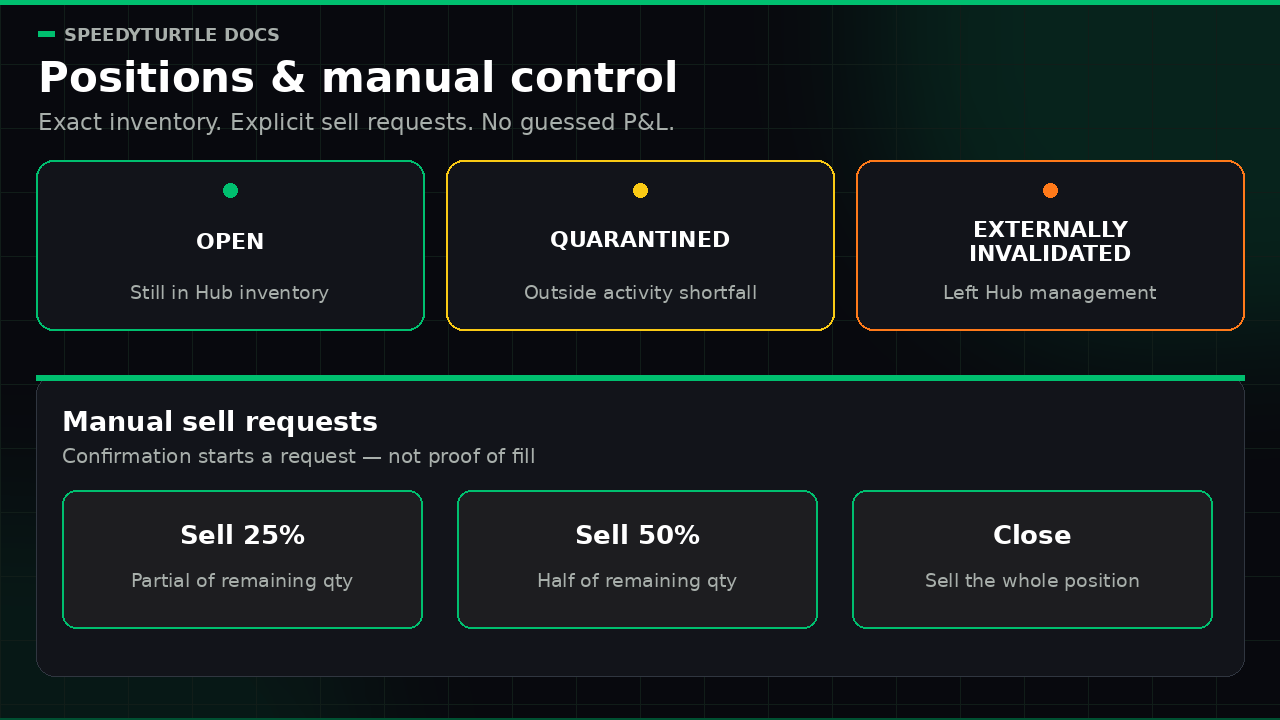
Each row shows the token, strategy, execution wallet, remaining quantity, opening time, quote asset when known, and one authoritative status:
- OPEN — the position remains in the Strategy Hub inventory
- QUARANTINED — confirmed outside wallet activity created a balance shortfall, so automated and ordinary manual actions are stopped while earlier Hub orders settle
- EXTERNALLY INVALIDATED — the position permanently left Strategy Hub management because its token attribution can no longer be proved
A successful sell-fill count is shown as a fact. It is not used to invent a Partial exit, Monitoring, or Exit pending stage. Fully sold positions leave the open inventory after authoritative reconciliation. Permanently invalidated positions appear in a separate read-only history section and are not described as sold or closed.
If token decimals are known, the remaining amount is shown in token units. Otherwise the exact raw base-unit quantity is preserved rather than guessing a decimal scale.
Position details
Open a position to see:
- full token-mint, quote-mint, execution-wallet, position, strategy, and available entry-order identities
- authoritative opening, last-fill, and projection-update timestamps
- exact remaining quantity and successful buy/sell fill counts
- quote accounting only when the position is complete and its denomination is known
- confirmed shortfall evidence for a quarantined or externally invalidated position
Complete supported accounting is labelled in the position's own quote asset:
- Total swap buy principal
- Total swap proceeds
- Realized swap P&L on sold tokens
- Average entry price of the tokens still open
- Successful-fill wallet cash flow in native SOL
SOL wallet cash flow is separate from quote profit or loss. On a USDC position it is not USDC P&L, and a negative value after an open Buy is expected cash outflow rather than proof of a trading loss. If any required accounting or denomination input is unavailable, these money values are hidden together instead of being shown as zero or silently labelled SOL.
The average entry price follows the exact remaining cost basis. A partial sell removes its allocated basis; a later top-up adds only its own basis. A repeating decimal may be labelled approximate for display, while the underlying raw amounts remain exact.
Manual control
Sometimes you want to act yourself. Each position offers:
- Sell 25%
- Sell 50%
- Close (sell the whole position)
How manual sells work
Percentages apply to the current authoritative remaining quantity. Manual sells ignore a Moonbag setting because they are an explicit user instruction.
The confirmation shows the strategy, token mint, execution wallet, remaining quantity, exact raw base units, percentage, and a caller request ID. That request ID makes a retry of the same logical request idempotent.
Warning
Confirming submits a request for dispatch. API acceptance does not prove that a transaction was submitted, confirmed, finalized, or filled, and it does not guarantee a fill price or proceeds. Review the resulting position and Activity Logs before treating the sale as complete.
If the service response cannot prove whether a request was accepted, the screen shows Sell outcome unknown. Check Activity Logs before retrying and reuse the same request ID; creating a new logical request could ask for another sell.
An accepted request carries reason code manual_sell_requested and its order identity into the same durable exit path as an automatic position sell. Activity can show the request and downstream execution result when recorded, but V1 does not present every intermediate provider and blockchain state as a complete transaction tracker. A request entry is never proof of a fill.
When a manual action is unavailable
A position action fails closed when the service cannot prove the required ownership, fresh position snapshot, exact remaining quantity, quarantine state, or single pending-exit claim. Controls are also unavailable when:
- an earlier sell request has an unknown or unresolved outcome
- the position is quarantined or externally invalidated
- the position has no authoritative sellable remainder
- operations temporarily withdraw manual position sells with the incident switch
Emergency Stop freezes automatic strategy activity, but deliberately leaves explicit position sells and the account-wide Close All operation available. Quarantine is different: it blocks ordinary manual selling because outside wallet activity has made position attribution unsafe.
After finalized reconciliation, a full close leaves the open list. A partial fill updates the exact remaining quantity and position accounting. Never infer either outcome from API acceptance alone.
Related pages
- Activity & Reason Codes — the recent reason-coded operational feed
- Strategy Builder — the exit rules that manage positions automatically
- Risk Center & Campaign Mode — and how to pause or close everything at once
Documentation maintained by SpeedyTurtle Labs.