
Activity & Reason Codes
Recent Strategy Activity is an operational view of what Strategy Hub recently observed, decided, requested, skipped, or completed. It is not a complete audit ledger or full-history search product.
An entry tells you what was recorded at its event time. Its absence does not prove that nothing happened: high-volume diagnostic skips are recent best-effort activity, and a temporary capture, persistence, projection, read, or update-stream problem can delay what the screen shows.
Open Activity
In Strategy Hub, open Logs on mobile or Activity Logs on desktop.
Filter and load activity
The controls narrow the server-backed feed:
- Type — All, Trades, Skips, Alerts, or Systems
- Strategy — one strategy or the whole account
- Search loaded activity — matches only entries already loaded in this session
- Load older — follows the server cursor without replacing the rows already on screen
The feed does not show global totals for a tab. A search miss means no match in the loaded rows, not that no older event exists.
Updates connected describes the live update stream only. It does not prove that Activity storage is healthy or complete.
What an entry shows
Entries are grouped by strategy, with account-wide events in an Account group, and appear newest first. Depending on the evidence available, a row or its detail view can show:
- the recorded event type, plain-language reason, and copyable reason code
- the strategy, token, venue, wallet, position, request, order, or source identity
- the authoritative event time in UTC
- a real transaction signature and explorer link, when one exists
- observed filter values that are safe to publish
Missing linkage stays unavailable; the client does not infer it from a nearby row.
Exact money and quantities
Finalized trade and position-close money appears only when accounting is complete and the quote is a supported SOL or USDC asset. The detail view names the quote asset and scale. Principal, proceeds, sold-token cost basis, realized swap P&L, and native-SOL wallet movement remain separate.
The API carries these values as exact integer strings and the client formats them without JavaScript floating-point conversion. If denomination, attribution, or accounting is incomplete, the screen says the financial details are unavailable instead of showing zero or assuming SOL.
A requested buy principal is a separate SOL allocation. It is not proof of the venue charge or of a fill.
For a Match Wallet % decision that reached exact sizing, expanded Activity also shows a compact signal-time calculation: the tracked wallet's exact SOL or USDC buy and quote scale; the resident SOL/USD rate and observation time when USDC conversion was required; the normalized SOL value; percentage and uncapped result; maximum; final requested amount; cap outcome; and lamport rounding rule. The client derives and cross-checks those values from exact integer strings rather than floating-point display fields. If the source evidence is incomplete or mathematically inconsistent, the calculation stays hidden and the reason code remains the explanation. The full Logs detail wraps long values so the compact Dashboard preview is not the only way to inspect them.
This calculation proves how Strategy Hub sized that recorded decision. It does not by itself prove provider submission, confirmation, finalization, fill, or actual venue spend.
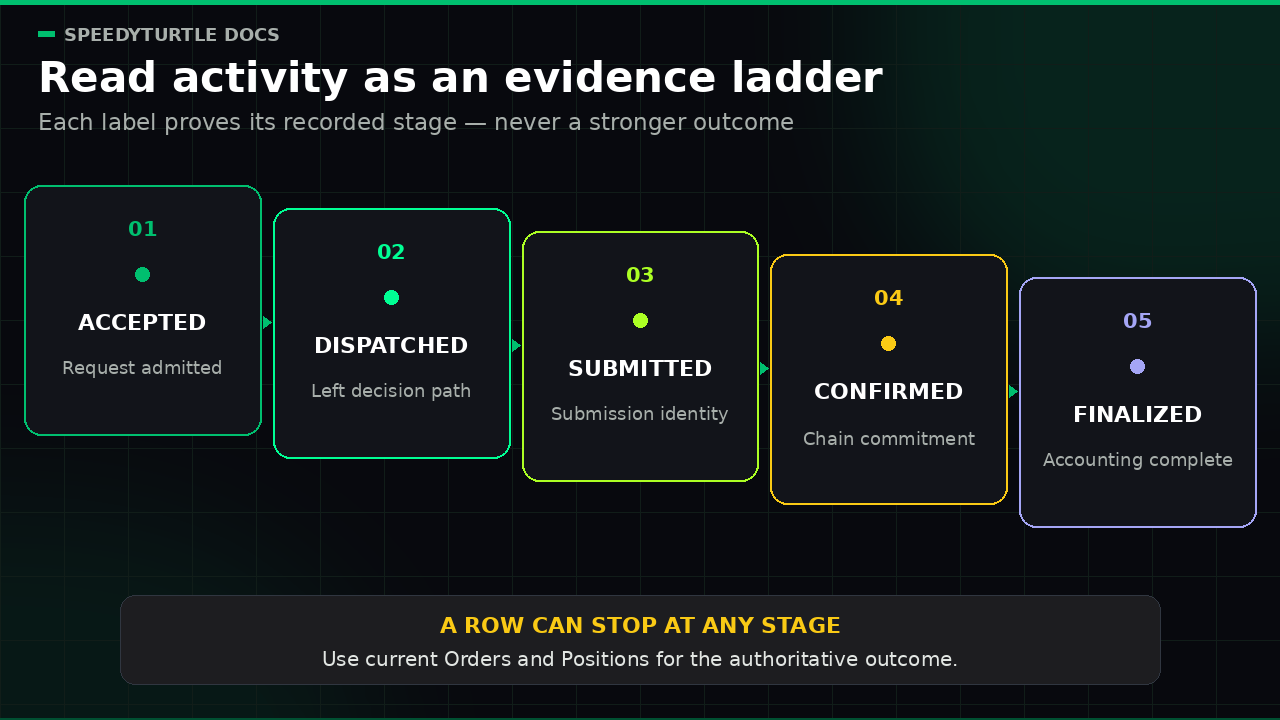
What lifecycle words prove
Treat each event as one state observation:
- Accepted means Strategy Hub admitted the request or lifecycle change. It does not prove provider submission or an on-chain result.
- Request dispatched means the request left the Strategy decision path. It does not prove provider submission, confirmation, finalization, or fill.
- Submitted requires a real downstream or chain submission identity. It is not confirmation or finalization.
- Confirmed records the observed chain commitment level. It is not the stronger finalized state.
- Finalized buy/sell is shown only from the finalized accounting projection.
- Canceled before submit means the recorded attempt ended before any submission was proved.
- Issue observed may later be superseded by stronger chain reconciliation; it is not automatically a terminal failure.
- Terminal failure means that recorded attempt has no more automatic work planned. It does not prove that no chain effect occurred unless reconciliation also proves that.
- Unknown means Strategy Hub cannot yet prove the downstream outcome; inspect current Orders and Positions state rather than treating it as failed.
- Exit request dispatched means a rule requested an exit; inspect the later order and position state for the result.
- Notification queued means a durable delivery request exists. Delivered is used only with a provider receipt; an alert or queued notification alone is not a Telegram delivery receipt.
- Campaign finished counts accepted buy attempts and requested SOL principal, not filled trades or actual on-chain spend.
- Close All Complete is earned only after an authoritative check finds no open or transitional Hub position, no unresolved Hub sell, and no in-flight entry or held reservation capable of opening one.
For an order or position outcome, the current Orders/Positions state is authoritative; Activity supplies recent context.
Retention and availability
High-volume filter and warming diagnostics are best effort and expire after seven days. Critical records are excluded from that diagnostic expiry rule, but Recent Strategy Activity is still not presented as a complete audit ledger. A diagnostic row can therefore be absent even though the strategy evaluated the signal.
The screen distinguishes:
- No recent Activity records for this selection — a current, unexpired
no_known_gapread returned no rows for this selection - No matches in loaded activity — search did not match the rows in memory
- Activity data unavailable — the initial read failed; use Retry
- Activity updates delayed — recorded rows remain visible while a recovery-safe local journal or the shared critical writer still owns a not-yet-visible fact, an authoritative projection is stale, or the latest refresh failed
- Activity history has a known gap — scoped recovery evidence proves that one or more critical facts are not currently present in live Activity; available rows remain visible
- Activity status unavailable — current capture or projection authority cannot prove freshness or continuity; recorded rows remain visible but must not be treated as complete
Common V1 reason codes
A reason code is a stable machine-readable label paired with a plain-language explanation. You can copy it when asking Support for help.
Data or filter input was unavailable
| Reason code | Meaning |
|---|---|
token_metadata_warming | Required token metadata or launch-time evidence has not finished loading. |
token_safety_warming | Required safety or holder evidence is not ready, so the strategy refused to guess. |
token_history_warming | The rolling or pre-migration history is still building. |
token_history_partial | Available history is only a lower bound and cannot prove the condition. |
execution_context_missing | No fresh resident price or market context could prove the condition. |
holder_snapshot_missing | Dev-holding evidence was unavailable. |
sol_price_unavailable | A required SOL/USD conversion had no fresh resident rate. No fetch was made during evaluation. |
unsupported_quote_asset | The observed quote was outside the supported SOL/USDC V1 set. |
unsupported_venue | The signal venue is outside the V1 Pump.fun/PumpSwap scope. |
wallet_intelligence_unavailable | Wallet-quality metrics were not available for the signal wallet. Wallet Intelligence filters remain Coming Soon in V1, so this code is reserved for that release. |
wallet_intelligence_partial | Wallet history was incomplete or lacked cost basis, so metrics could not prove the filter. Reserved for the Wallet Intelligence release. |
A warming or unavailable reason means the strategy skipped rather than converting missing evidence into a safe-looking value.
A V1 allocation or position limit refused the buy
| Reason code | Meaning |
|---|---|
max_buy_amount_exceeded | Requested SOL principal exceeded this strategy's per-buy cap. |
daily_spend_cap_reached | The next buy would exceed the strategy's accepted requested-principal cap for the current UTC day. |
max_open_positions_reached | The strategy already held its allowed number of open positions. |
consecutive_loss_limit_reached | The configured number of losing full position closes paused new entries. |
campaign_trade_limit_reached | The campaign reached its accepted-buy-attempt cap. |
campaign_spend_cap_reached | The next request would exceed, or the campaign reached, its requested-principal cap. |
emergency_paused | Account-wide Emergency Stop fenced automatic entries, exits, waits, callbacks, and retries. |
An exit rule requested or skipped work
| Reason code | Meaning |
|---|---|
take_profit_level_hit | A take-profit rung requested its configured share of the original bought quantity. |
stop_loss_hit | The position's quote-native stop threshold requested an exit. |
sell_by_time_hit | The configured time exit elapsed. |
copied_wallet_sold | The copied-wallet sell reaction fired. |
dev_sold | The dev-sell reaction fired. |
manual_sell_requested | An explicit manual-sell request was accepted for dispatch; this does not prove a fill. |
moonbag_floor_reached | The retained Moonbag floor prevented a further automatic sell. |
dust_remainder | The remaining executable quantity was too small to dispatch. |
exit_dispatch_failed | An exit request could not be dispatched. |
exit_order_timed_out | Confirmation was not observed within the expected window; inspect current state. |
exit_retries_exhausted | Automatic retries ended; inspect the position and consider a manual sell. |
pending_order_does_not_match_closing_order | The position closed, but its saved pending sell could not be matched to the closing order. The record was preserved for review; this does not imply an additional sell. |
Trailing stop is not a V1 exit and has no public launch reason code.
Related pages
- Positions & Manual Control — authoritative inventory and manual exits
- Risk Center & Campaign Mode — allocation, loss-streak, Campaign, and Close All semantics
- Strategy Builder — the exact V1 trigger, condition, action, exit, and risk catalog
Documentation maintained by SpeedyTurtle Labs.