
Risk Center & Campaign Mode
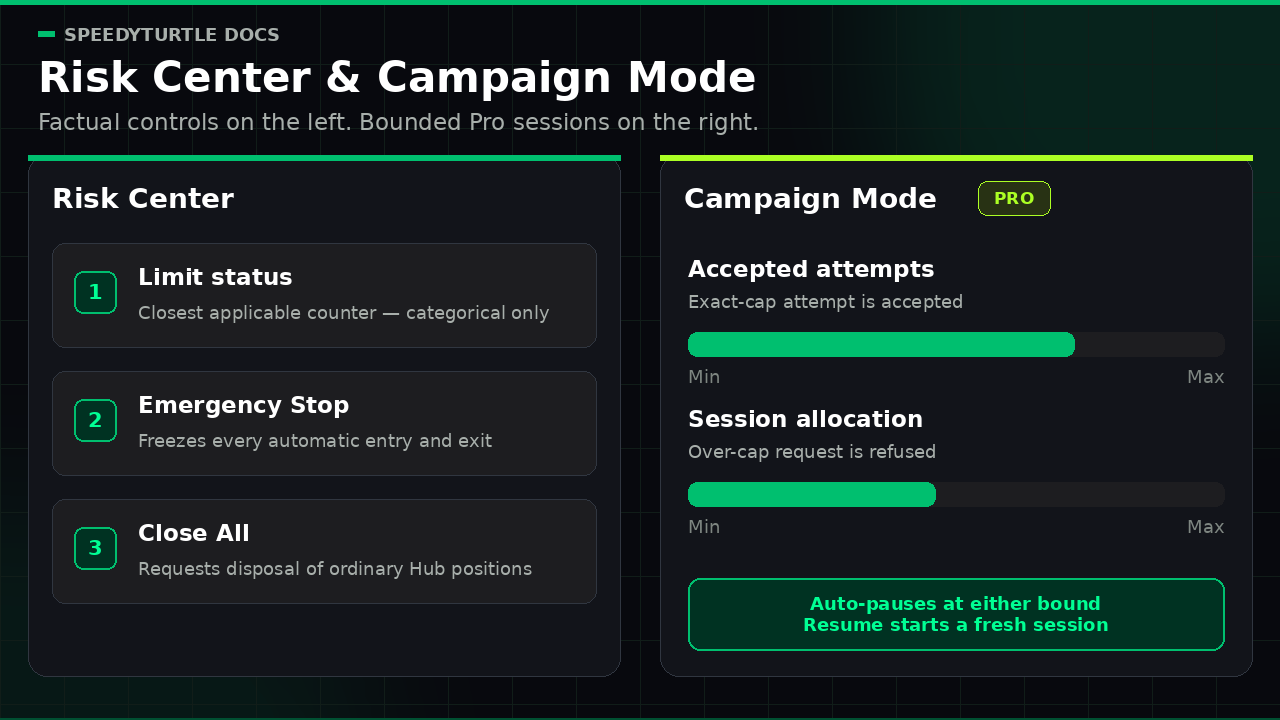
The Risk Center is an operational safety panel. It shows factual strategy-limit counters, whether the account-wide emergency latch is engaged, and the controls for pausing automation or attempting to close every Strategy Hub position. Campaign Mode is a Pro feature for running a strategy as a bounded session.
Open the Risk Center
- In the Strategy Hub, open Risk (mobile) or Risk Center (desktop).
Limit Status
The headline reports one categorical state:
- WITHIN LIMITS — every visible applicable counter is below 80% of its configured limit
- NEAR LIMIT — the closest visible applicable counter is at least 80% but below its limit
- LIMIT REACHED — at least one visible applicable counter has reached its limit
- AUTOMATION PAUSED — the account-wide Emergency Stop latch is engaged
- NO LAUNCHED STRATEGIES — only Drafts, or no strategies, exist
- DATA UNAVAILABLE — the service could not verify the required data
The limit headline uses the single closest visible limit; it is never an average. Draft strategies and hidden controls do not dilute or increase it.
Info
Limit Status is not a risk score, market-risk model, probability, recommendation, or profitability forecast. The Risk Center does not claim current portfolio exposure or Total at risk.
A status badge reads CHECKING, GUARDING, PAUSED, or UNAVAILABLE. Required API failure never renders as a safe green or zero state.
The summary cards show factual Open positions, Live strategies, and Inflight orders. A delayed or failed source is shown as unavailable instead of being treated as zero.
Strategy limits
The Strategy limits panel includes every launched strategy, including Paused or Error strategies whose positions or counters still matter. Drafts are excluded.
Each row shows its lifecycle and only the limits exposed for V1:
- Max allocation per buy
- Daily allocation — accepted requested principal in the current UTC day
- Open positions
- Consecutive losses, when configured
- Campaign attempts and Session allocation, when Campaign Mode is configured
- the execution wallet's SOL balance and sample age, or unavailable
Minimum SOL reserve, Maximum daily loss, Lifetime strategy budget, Lifetime maximum trades, and internal inflight backpressure are not public per-strategy V1 controls and do not appear in Limit Status.
Info
Trading definitions are immutable after their first activation. Configure limits while authoring a Draft; if you later want different trading rules, Duplicate the strategy into a new Draft (or start a new strategy) rather than expecting the Risk Center to edit a running or paused definition.
Emergency controls
Two controls let you act fast. They behave very differently on purpose.
Pause all strategies
- Freezes all automatic activity: no new entries, and no automatic exits either.
- Stop losses, take-profits, time exits, copied-wallet sells and dev sells stop running while the emergency stop is engaged. This is deliberate — an emergency stop that kept selling would not be a stop.
- Transactions already sent to the blockchain cannot be recalled and will finish settling. Passive fill, position, and balance reconciliation continues from what actually happens on chain.
- Explicit position sells and Close All remain the deliberate operator override, unless a position is quarantined/permanently invalidated or operations have temporarily withdrawn ordinary manual position sells with the incident switch.
- After the service confirms the durable latch, the screen reports PAUSED and exposes Lift emergency latch.
Use this when you want everything automatic to stop right now and you would rather decide what happens next by hand.
Warning
Because automatic exits are frozen too, your open positions are not being protected by their stop losses while the emergency stop is engaged. Close positions manually, or reactivate the strategies you want protecting them.
Lifting the latch clears Emergency Stop but does not restart anything. Every strategy stays paused, and no exit, timer, or trigger missed during the freeze is replayed. Reactivate each strategy explicitly when you are ready.
Close all positions
- Takes one authoritative account-wide inventory and attempts to close every ordinary open Strategy Hub position across every managed wallet — not just the wallet or page you are viewing. It does not sell unrelated wallet inventory.
- It also engages the emergency stop. You do not need to press Pause all first; Close All raises the freeze before inventory so no later automatic entry may be published. An entry submitted before the freeze can still settle, and a late position is reported as remaining work rather than hidden.
- Because of that, your strategies are all paused when it finishes, and stay paused until you reactivate them. Lifting the latch afterwards does not restart them.
- Confirmation starts a durable operation; it does not mean every sell was submitted or filled. There is no undo for a transaction that is submitted.
- A position is reported closed only after authoritative fill and position reconciliation. A quarantined position follows the separate permanent EXTERNALLY INVALIDATED outcome and is never described as sold or given invented proceeds.
- Complete requires a verified zero-open, zero-unresolved-sell, and zero-capable-inflight-entry result. A failed route, unresolved order, late fill, or pending quarantine transition produces Action required with the remaining work, never a clean success.
- Running Close All again is safe because the operation and its per-position children use deterministic identities; it can address whatever authoritative work remains without re-selling a reconciled closure.
Warning
Both controls stop automation. Pause all freezes automatic work and keeps the current positions. Close all positions freezes automatic work and requests disposal of every ordinary position, while truthfully reporting anything it cannot resolve. Read the account-wide confirmation carefully.
Campaign mode
Campaign Mode turns a position-opening Buy or Copy Buy strategy into a bounded session. It is available on Pro.
Campaign Mode bounds accepted buy attempts and the SOL principal allocated to those attempts. It does not count only successful fills or claim actual on-chain spend.
How a campaign works
- In the Strategy Builder's
STOP WHENstage, enable campaign mode (or start from the Campaign Sniper template). - Set the session limits:
- Trades per campaign — the maximum number of position-opening Buy or Copy Buy attempts accepted for dispatch
- Session spend cap (optional) — the maximum requested SOL principal allocated to accepted buy attempts
- Activate the strategy. The session starts immediately.
- An attempt that reaches a cap exactly is accepted and then completes the campaign. An attempt that would exceed the Session spend cap is refused and completes the campaign without charging the refused amount.
- The campaign auto-pauses at either bound and records the completion reason and recap using accepted attempts and requested allocation.
- Resume deliberately starts a fresh session and resets both campaign counters to zero.
An accepted attempt remains counted if it later has no fill, fails downstream, or spends less on-chain than requested. Requested allocation excludes priority fees, tips, network fees, and other costs. Copy Buy follow-up accumulation is not part of V1 Campaign counting because follow-up copying is not exposed for V1.
Info
The V1 recap does not combine realized P&L. A campaign may span WSOL and USDC positions, so one total would mix unlike currencies or require a separate valuation policy. The recap remains factual about accepted attempts, requested SOL allocation, duration, completion reason, and skips. Exact per-quote P&L buckets are post-launch work.
How campaign limits relate to your other limits
Campaign limits sit on top of the ordinary V1 controls; they do not replace Max allocation per buy, Daily allocation, Max open positions, Stop after consecutive losses, or the strategy's exit rules.
Campaign counters are session-scoped. Resume creates a new session generation so delayed work from the previous run cannot charge the new counters. The hidden lifetime Max trades field is not a Strategy Hub V1 control.
The completion reason is campaign_trade_limit_reached or campaign_spend_cap_reached. Activity and delivery acceptance are tracked separately; the reason code does not by itself prove that a notification was delivered.
Related pages
- Strategy Builder — where limits and campaign mode are set
- Positions & Manual Control — stepping in on a single position
- Plans and Pricing — campaign mode is a Pro feature
Documentation maintained by SpeedyTurtle Labs.